switek email

sales06@switek.biz

switek whatsapp

+86 186 5927 5869

Abonnieren Sie uns

.

HIGH SPEED IML ROBOT

Keywords:Panasonic A6 Servo Installation Instruction, Panasonic A6 Driver, Panasonic A6 Series Servo Motor Manual

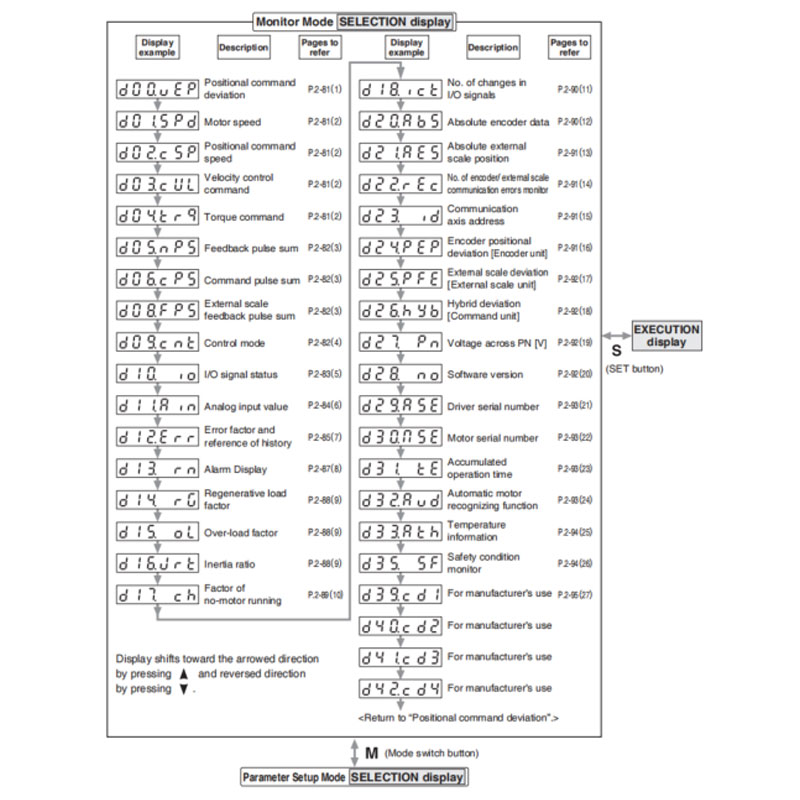
14. How to Use the Front Panel — Monitor Mode (SELECTION display)

Abstract

To change the monitor display setting, select the display option to be changed from " SELECTION display", and press S to change to " EXECUTION display". After completion of changing, press S to return to the selection display.
Panasonic A6 Servo Motor

Note → When you turn on the Product for the first time, display show r 0. (at motor stall) To change this display, change the setup of Pr5.28 (Initial status of LED).


PanasonicA6 Operating Instruction

Email: sales06@switek.biz

WhatsApp

WeChat
