sales06@switek.biz

+86 186 5927 5869

Shopping

Subscrib to Us
sales06@switek.biz
+86 186 5927 5869
Shopping
Subscrib to Us

Keywords:Panasonic A6 Servo Installation Instruction, Panasonic A6 Driver, Panasonic A6 Series Servo Motor Manual
The correct setup of the parameter and mode of the Panasonic A6 series of servo will ensure the proper working of the Panasonic A6 series of motor and the stability of your machineries and automation system.
| Parameter No. | Title | Range | Default | Unit | Turning on of power supply | Related Control Mode | Detail page | ||||||
|---|---|---|---|---|---|---|---|---|---|---|---|---|---|
| Class | No. | A, B-frame | C-frame | D,E,F-frame | P | S | T | F | |||||
| 7 | 00 | For manufacturer's use | — | 0 | — | 4-84 | |||||||
| 7 | 01 | For manufacturer's use | — | 0 | — | ||||||||
| 7 | 02 | For manufacturer's use | — | 0 | — | ||||||||
| 7 | 03 | For manufacturer's use | — | 0 | — | ||||||||
| 7 | 04 | For manufacturer's use | — | 0 | — | ||||||||
| 7 | 05 | For manufacturer's use | — | 0 | — | ||||||||
| 7 | 06 | For manufacturer's use | — | 0 | — | ||||||||
| 7 | 07 | For manufacturer's use | — | 0 | — | ||||||||
| 7 | 08 | For manufacturer's use | — | 0 | — | ||||||||
| 7 | 09 | For manufacturer's use | — | 0 | — | ||||||||
| 7 | 10 | For manufacturer's use | — | 0 | — | ||||||||
| 7 | 11 | For manufacturer's use | — | 0 | — | ||||||||
| 7 | 12 | For manufacturer's use | — | 0 | — | ||||||||
| 7 | 13 | For manufacturer's use | — | 0 | — | ||||||||
| 7 | 14 | Main power turn-off warining detection time | 0 to 2000 | 0 | ms | ○ | ○ | ○ | ○ | ○ | |||
| 7 | 15 | For manufacturer's use | — | 0 | — | ||||||||
| 7 | 16 | For manufacturer's use | — | 0 | — | ||||||||
| 7 | 20 | For manufacturer's use | — | 0 | — | ||||||||
| 7 | 21 | For manufacturer's use | — | 1 | — | ||||||||
| 7 | 22 | Special function enhancement setting 1 | -32768 to 32767 | 0 | — | ||||||||
| 7 | 23 | For manufacturer's use | — | 0 | — | ||||||||
| 7 | 24 | For manufacturer's use | — | 0 | — | ||||||||
| 7 | 25 | For manufacturer's use | — | 0 | — | ||||||||
| 7 | 26 | For manufacturer's use | — | 0 | — | ||||||||
| 7 | 27 | For manufacturer's use | — | 0 | — | ||||||||
| 7 | 28 | For manufacturer's use | — | 0 | — | ||||||||
| 7 | 29 | For manufacturer's use | — | 0 | — | ||||||||
| 7 | 30 | For manufacturer's use | — | 0 | — | ||||||||
| 7 | 31 | For manufacturer's use | — | 0 | — | ||||||||
| 7 | 32 | For manufacturer's use | — | 0 | — | ||||||||
| 7 | 33 | For manufacturer's use | — | 0 | — | ||||||||
| 7 | 34 | For manufacturer's use | — | 0 | — | ||||||||
| 7 | 35 | For manufacturer's use | — | 0 | — | ||||||||
| 7 | 36 | For manufacturer's use | — | 0 | — | ||||||||
| 7 | 37 | For manufacturer's use | — | 0 | — | ||||||||
| 7 | 38 | For manufacturer's use | — | 0 | — | ||||||||
| 7 | 39 | For manufacturer's use | — | 0 | — | ||||||||
| 7 | 41 | For manufacturer's use | — | 0 | — | ||||||||
| 7 | 87 | For manufacturer's use | — | 0 | — | ||||||||
| 7 | 91 | For manufacturer's use | — | 0 | — | ||||||||
| 7 | 93 | For manufacturer's use | — | 0 | — | ||||||||
Caution → The symbol "*" attached to "Unit". indicates that the digits of setting unit will change if the parameter is set by using the setup support software PANATERM.
Note → Parameter describes of this page is P.4-6 to P.4-85.

SW6710
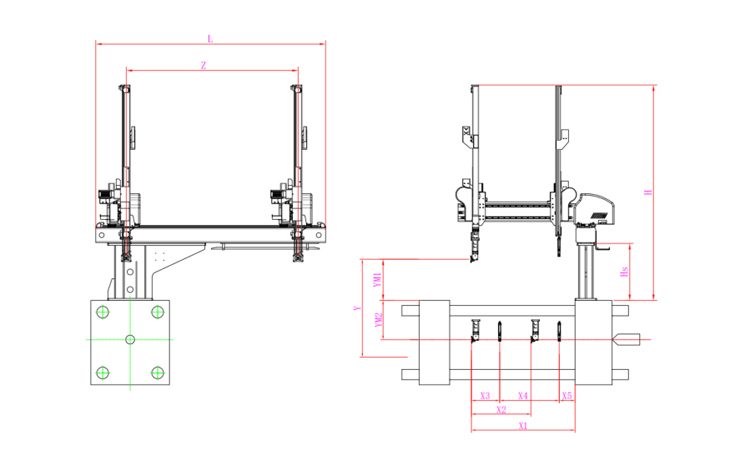
Unit: mm
| X1 | X2 | X3 | X4 | Y | YM1 | YM2 | Z | L | W | H | Payload | 1055 | 607 | 288 | 607 | 1000 | 420 | 580 | 1750 | 2340 | 1700 | 2190 | 8kg |
|---|
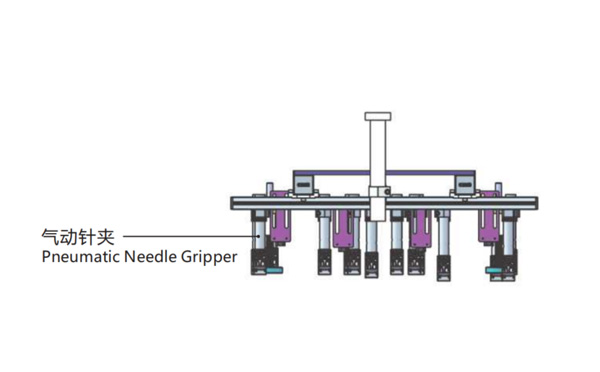
EOAT Assembly Demonstration -- Two Cavities Non-woven Fabric In Mold Insertion
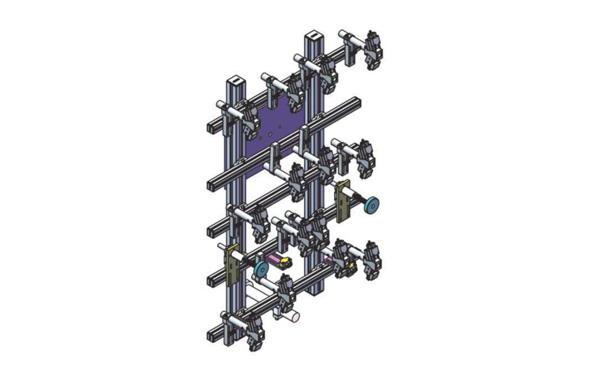
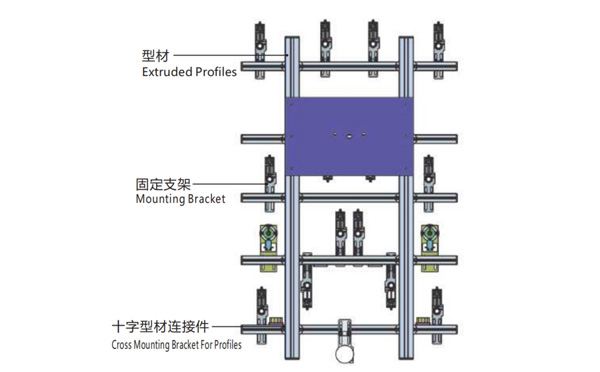
Product Descriptions
Bom List
| Product Name | PN # | Model | Quantity |
|---|---|---|---|
| Extruded Profiles | 4.Y00052 | PEP4040-1000 | 2 |
| Plugs for Profile | 4.Y00072 | PEP4040 | 4 |
| Extruded Profiles | 4.Y000481 | PEP2525-1500 | 2 |
| Extruded Profiles | 4.Y00481 | PEP2525-1000 | 1 |
| Plugs for Profile | 4.Y00070 | PEP2525 | 10 |
| Cross Mounting Bracket for Profiles | 7.Y00356-T | SMBA-2540T | 10 |
| Pneumatic Needle Gripper | 8.Y00025 | GN2010 | 14 |
| Mounting Bracket | 7.Y00308-T | SMBE2-2060T | 14 |
| Mounting Bracket | 7.Y00309-T | SMBE2-3060T | 1 |
What is a Picking Robot?
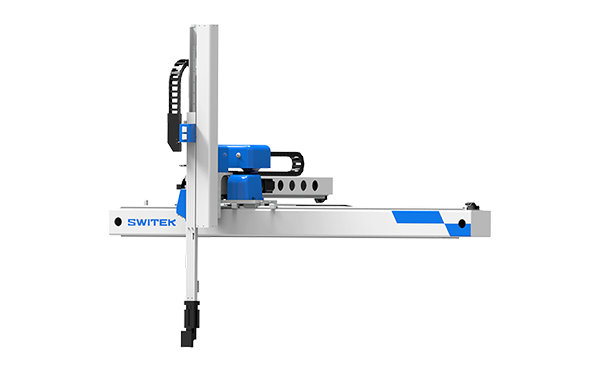
A picking robot in an injection project is a robotic arm which will pick the parts from the mould and have it placed on the conveyor or other automation system to have another processing. The projector will choose a picking robot according to the size of the injection molding machine, the injection cycle time, the weight of the parts etc to choose a picking robot.
Take the SWITEK hgih speed 3 axis servo robot SW7112DS as an example, with a pay load of 2kg and a dry cycle time of 3.3s only designed for injection molding machine ranging from 150Ton ~ 500Tone, it could be regarded as one of the best picking robot for the thin-wall containers production business with a picking capacity up to 8 cavities of 700ml cups, but if for the picking of a bumper it would not be suitable. Anyway, to choose a picking robot for your injection project, the key point would be: