sales06@switek.biz

+86 186 5927 5869

Shopping

Subscrib to Us
sales06@switek.biz
+86 186 5927 5869
Shopping
Subscrib to Us

Keywords:IML Robot; IML Robot Operating; In Mold Labeling Robotics
In our daily use of an IML robot, it's a good habit to backup the program after the parameters setting in case that there's a wrong operating or setting in the future. In this chapter we'll discuss how to export the program of the IML robot to a USB and how to reload a program from the USB key.
The following requirements must be met when using PENDANT to download the program:
First of all, you need to create 4 new folders in the USB root directory:
[penupdate], [pen_msg], [controllerupdate], [NCP]
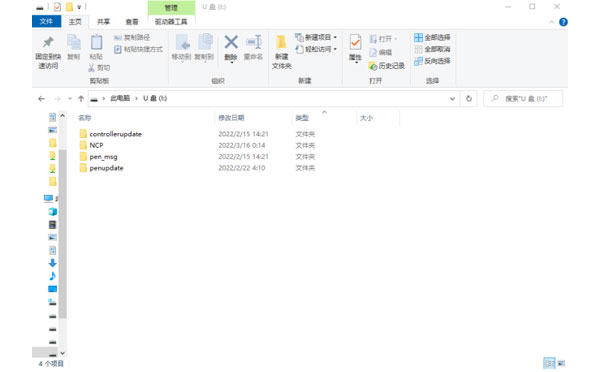
Place the downloaded file inside the corresponding folder, see the table below:
A List of Corresponding Files
| Folder on the left | File on the right | Illustrate | |
|---|---|---|---|
| [penupdate] | pne_set | pendant setup | the reboot takes effect |
| pendant-gui | Qt linux executable file | ||
| pen_msg | all_msg.txt | Pendant Textual information | |
| Other msg... | Pendant Textual information | ||
| [controllerupdate] | TRC1000.dsb | Controller action program | |
| TRC1000.dop | Controller initialization, setup | ||
| motc.dat | Motion control programs | ||
| machine01 | Mechanical parameter program 01 | ||
| ... | ... | ||
| machine32 | Mechanical parameter program 32 | ||
| [NCP] | NCP01.NCP | NCP File | Compiles to take effect |
| ... | |||
| NCP99.NCP | NCP File | ||
Insert the USB into the USB port of the handset, and it is recommended to choose a regular brand of USB that has not been specially handled.
Tap the [File Management] icon at the top of the screen  , select [Import from USB].
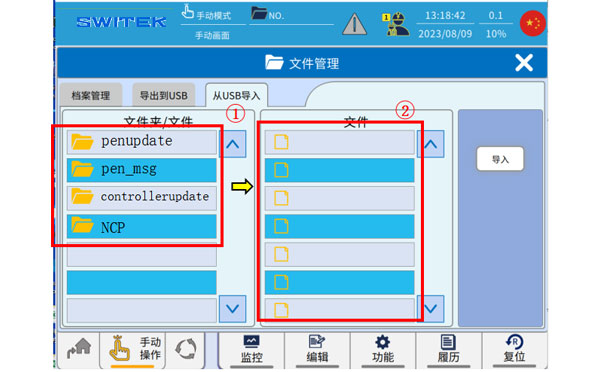
When a file is recognized in the USB, [Import from USB] displays the folder prepared in advance on the USB flash drive.
Click to select the folder in (2) to display the subfiles in the folder in (1), select the subfiles you want to import, and click Import. (If you only select (2) and click[Import], all the contents of the folder will be downloaded).
After the download is complete, the downloaded file will be restarted according to the prompts of the downloaded file, and the downloaded file will take effect after the restart.
For details of whether you need to restart, please refer to the [File Download Table]
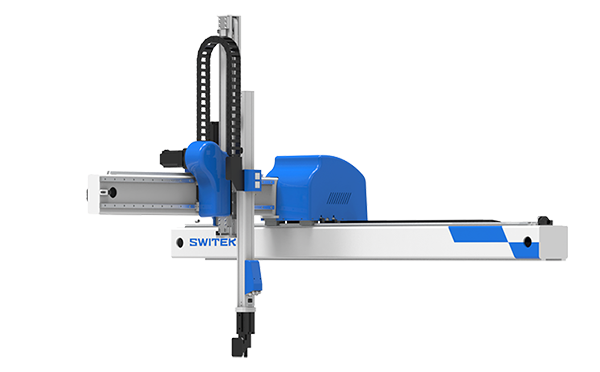
SW6310DS-20
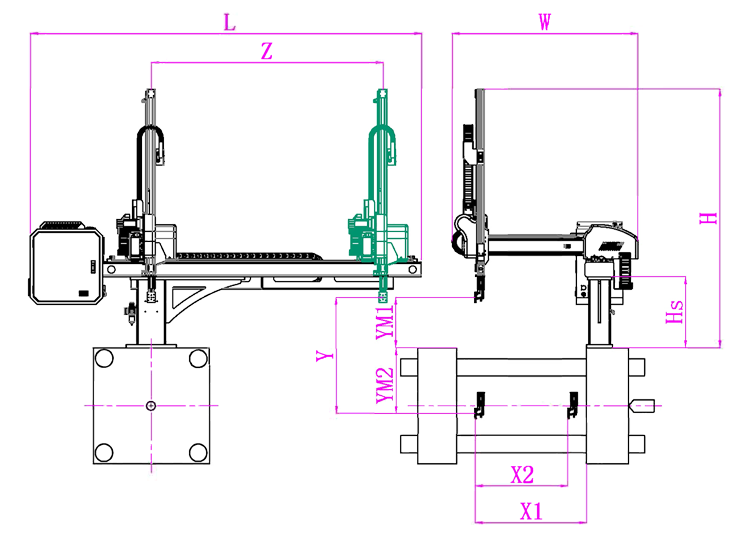
Unit: mm
| X1 | X2 | X3 | X4 | Y | YM1 | YM2 | Z | L | W | H | Payload | 740 | 805 | 0 | 0 | 1000 | 235 | 765 | 1650 | 2640 | 1500 | 1580 | 3kg |
|---|
EOAT Assembly Demonstration -- Two Cavities Non-woven Fabric In Mold Insertion
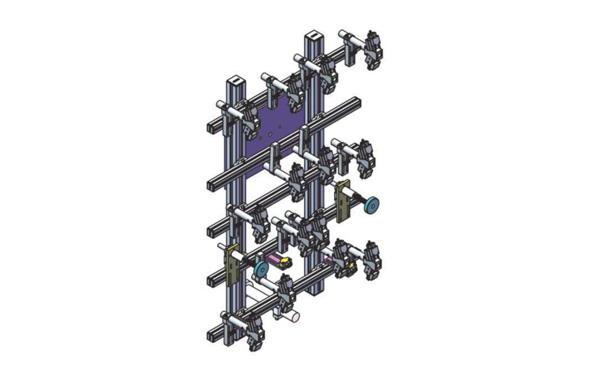
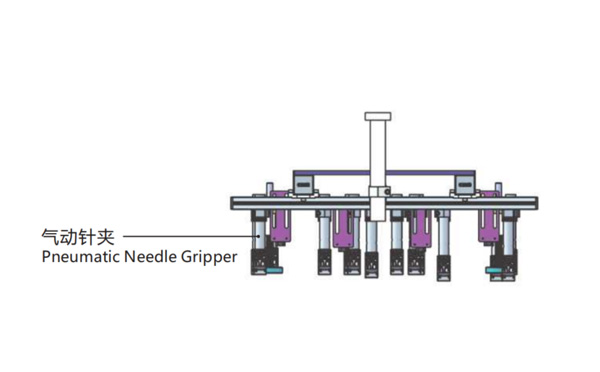
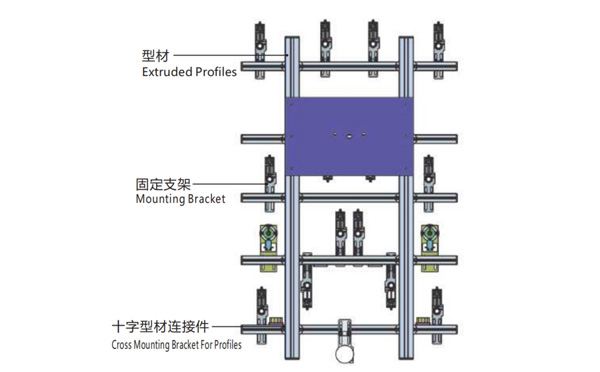
Product Descriptions
Bom List
| Product Name | PN # | Model | Quantity |
|---|---|---|---|
| Extruded Profiles | 4.Y00052 | PEP4040-1000 | 2 |
| Plugs for Profile | 4.Y00072 | PEP4040 | 4 |
| Extruded Profiles | 4.Y000481 | PEP2525-1500 | 2 |
| Extruded Profiles | 4.Y00481 | PEP2525-1000 | 1 |
| Plugs for Profile | 4.Y00070 | PEP2525 | 10 |
| Cross Mounting Bracket for Profiles | 7.Y00356-T | SMBA-2540T | 10 |
| Pneumatic Needle Gripper | 8.Y00025 | GN2010 | 14 |
| Mounting Bracket | 7.Y00308-T | SMBE2-2060T | 14 |
| Mounting Bracket | 7.Y00309-T | SMBE2-3060T | 1 |
What Would be a SWITEK Turn-key 8 Cavities silicone Cartridge Tubes Side Entry IML Solutions Include?
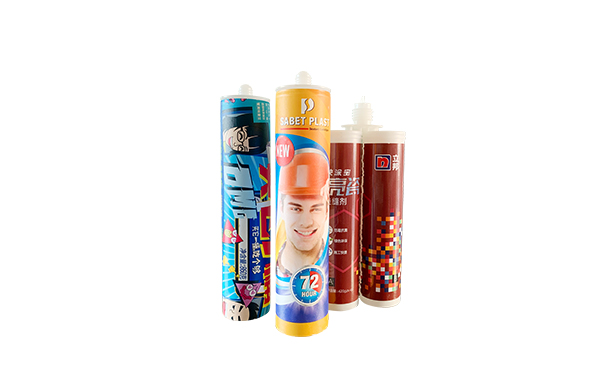
With the advancement of the IML technology, more and more silicone cartridge producers choose to have an IML silicone cartridge tubes as the subsitution of the traditional off print silicone cartridge tubes. With an IML solutions, the silicone cartridge tubes producer will be able to produce an IML silicone cartridge tubes immediately after the injection process.
Generally for one set of silicone cartridge tubes there are 3 parts, the body of the silicone tube,the caps for the repeat use of the silicone sealant and the bottom block which you can push the sealant out. So for a standard turn-key IML solutions of an 8 cavities silicone cartridge tubes SWITEK will provide:
For the injection molding machine the silicone cartridge producer can choose to buy from the local distributors or have SWITEK to buy it as part of the turn-key IML solutions.
For more information about a turn-key IML solution for Silicone cartridge tube please feel free to contact Adams from SWITEK Automation for a professional proposal of a ready to work IML system for IML Silicone cartridge production.