sales06@switek.biz

+86 186 5927 5869

Shopping

Subscrib to Us
sales06@switek.biz
+86 186 5927 5869
Shopping
Subscrib to Us

Keywords:Panasonic A6 Servo Installation Instruction, Panasonic A6 Driver, Panasonic A6 Series Servo Motor Manual
To change the monitor display setting, select the display option to be changed from "
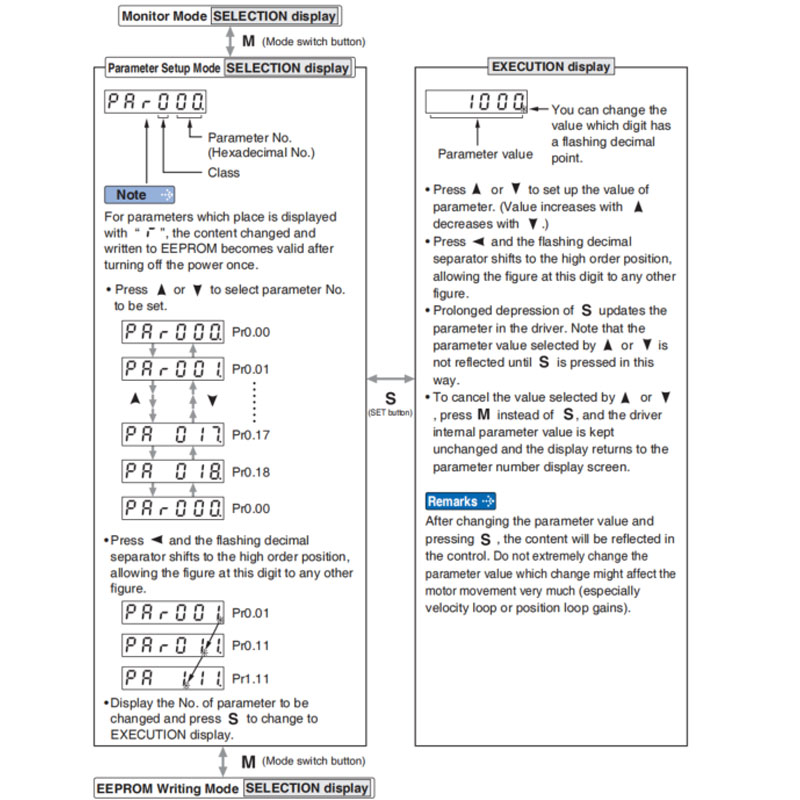
Note → • After setting up parameters, return to SELECT mode, referring to structure of each mode (P.4-42).
• Each parameter has a limit in number of places for upper-shifting.
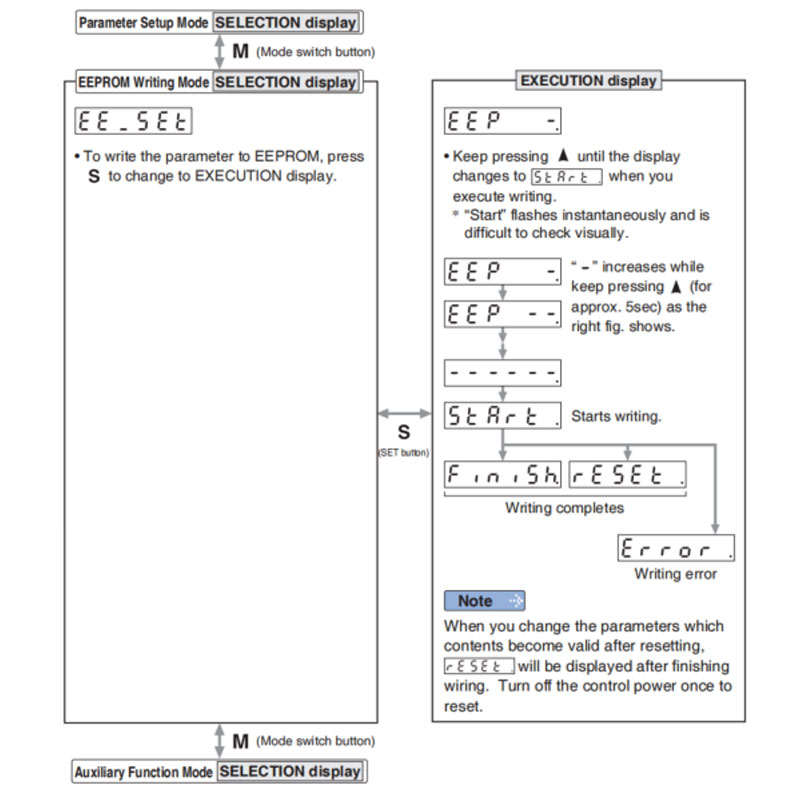
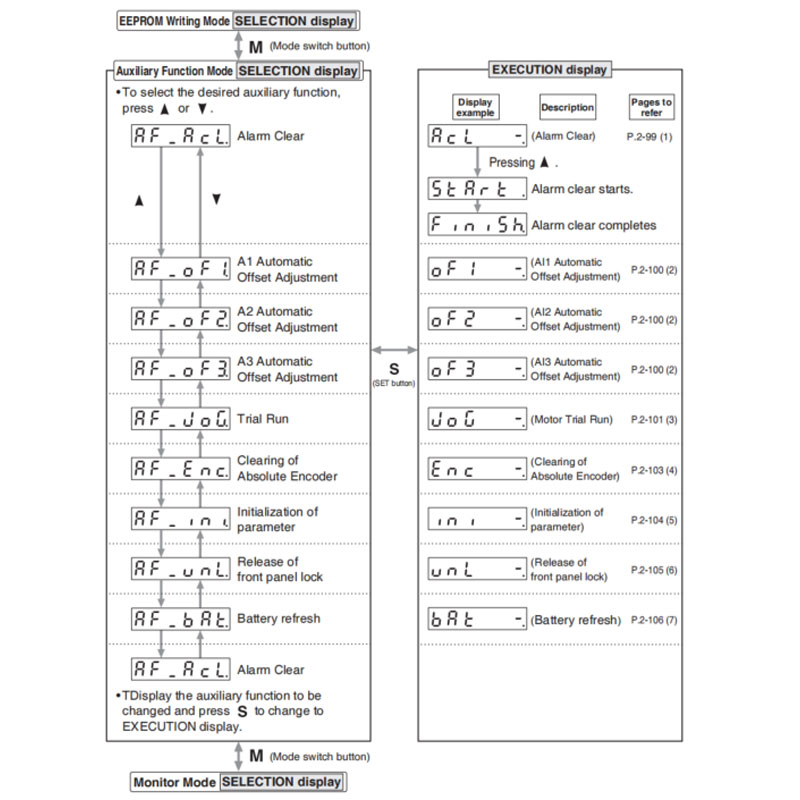
This function releases the current alarm status. Certain alarms will persist. If this is the case, refer to P.6-2 "When in Trouble - Protective Function".
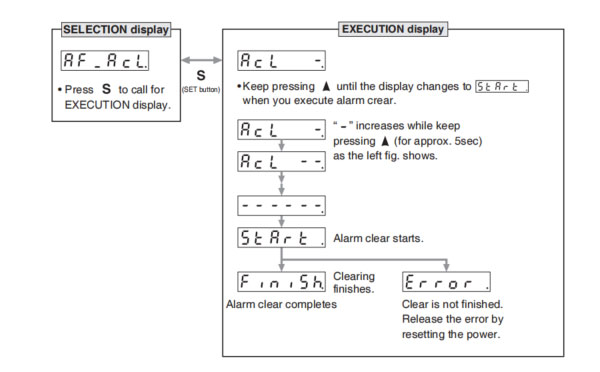
Note → • After alarm cleaning, return to SELECTION display, referring to structure of each mode (P.2-76).
This function automatically ajusts offset setting of analog input.
Analog input 1 (Al1)……Pr4.22 (Analog input 1(Al1) offset setup)
Analog input 2 (Al2)……Pr4.25 (Analog input 2(Al2) offset setup)
Analog input 3 (Al3)……Pr4.28 (Analog input 3(Al3) offset setup)
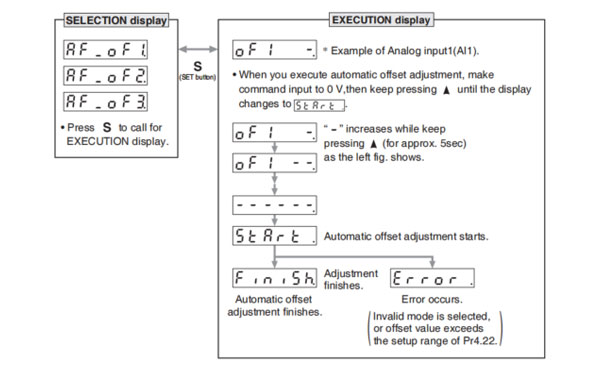
Remarks → • You cannot write the data only by executing automatic offset adjustment. Execute a writing to EEPROM when you need to reflect the result afterward.
Note → • After completion of the automatic offset adjustment, return to SELECTION display by referring to P.2-76 "Structure of Each Mode".
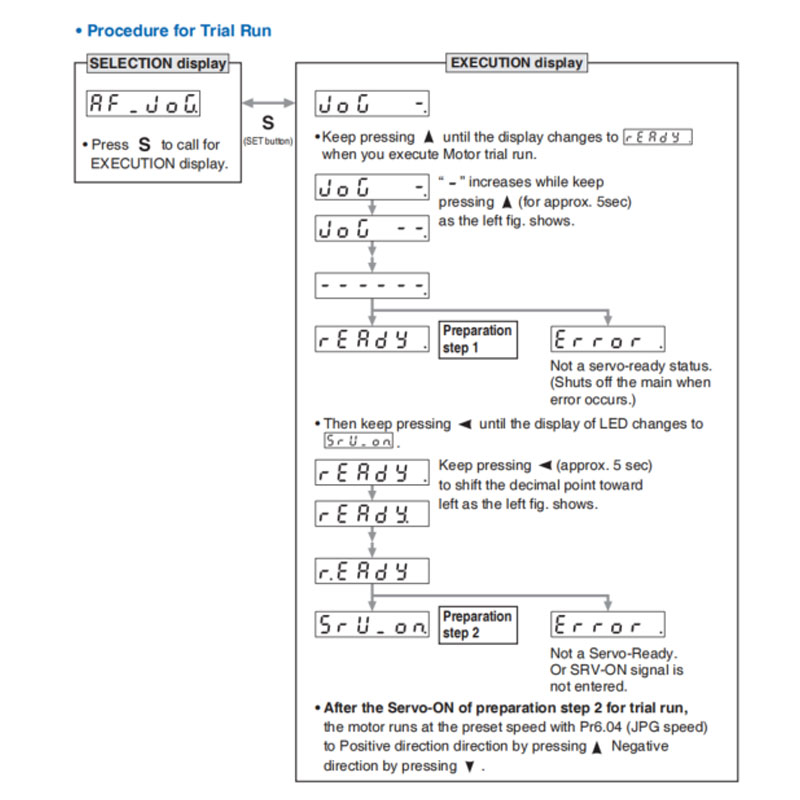
You can make a trial run (JOG run) without connecting the Connector, Connector X4 to the host controller such as PLC.
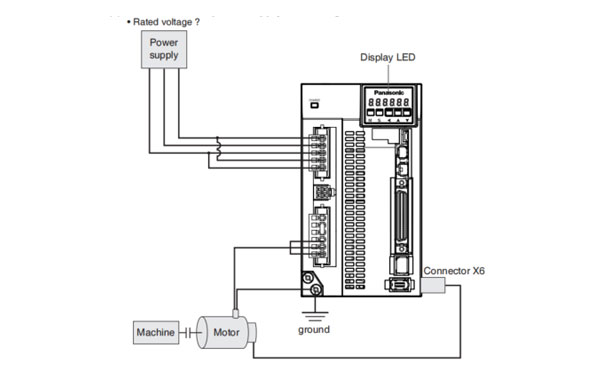
(1) Inspection on wiring
You can clear multi-turn data of the absolute encoder.
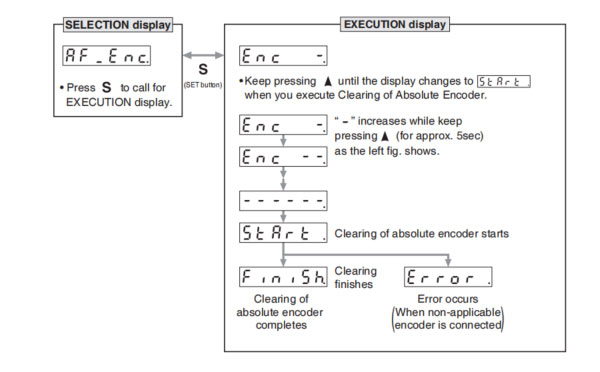
Note → • After clearing of absolute encoder finishes, return to SELECTION display, referring to structure of each mode (P.2-76).
Initialize the parameter.
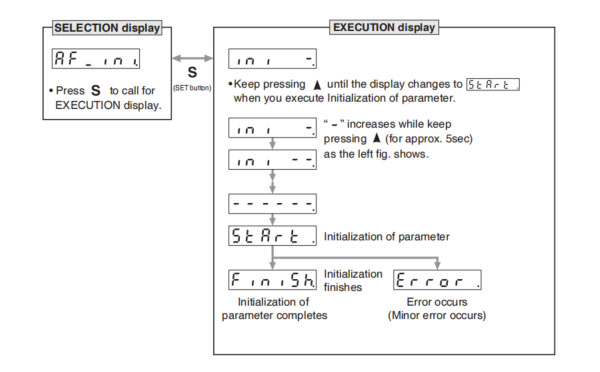
Release the front panel lock setting.
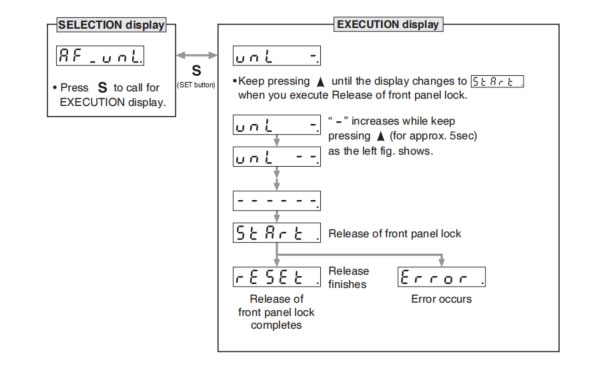
Note → • After release of front panel lock finishes, return to SELECTION display, referring to structure of each mode (P.2-76).
Battery refresh action is conducted.
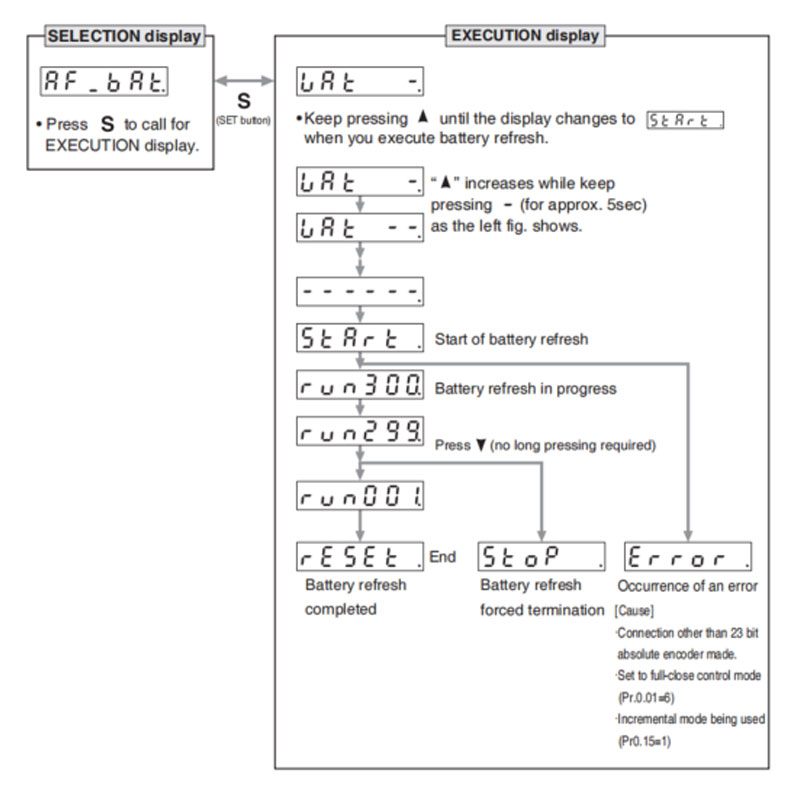
Note 1) When running Battery refresh, Battery alarm may occur in that case, please run the clear Battery alarm.
Note → • After release of front panel lock finishes, return to SELECTION display, referring to structure of each mode (P.2-76).

SW6710S
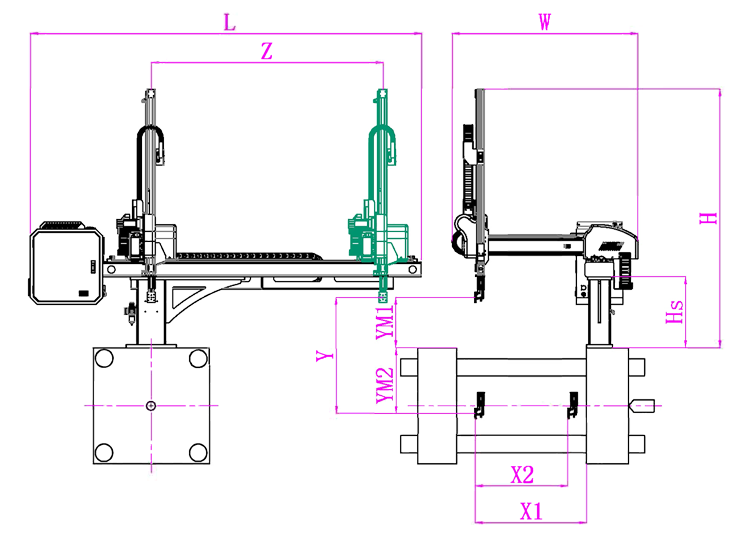
Unit: mm
| X1 | X2 | X3 | X4 | Y | YM1 | YM2 | Z | L | W | H | Payload | 900 | 750 | 0 | 0 | 1000 | 420 | 580 | 1750 | 2780 | 1610 | 1930 | 8kg |
|---|
EOAT Assembly Demonstration -- Two Cavities Non-woven Fabric In Mold Insertion
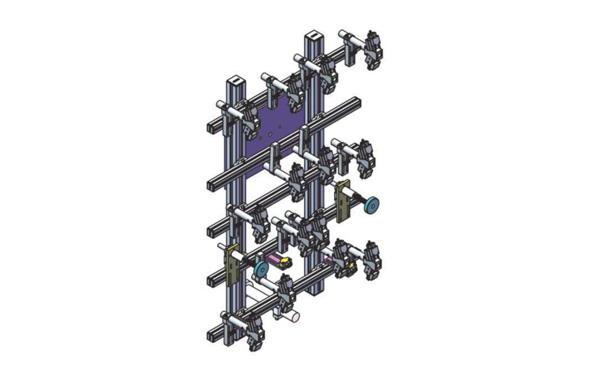
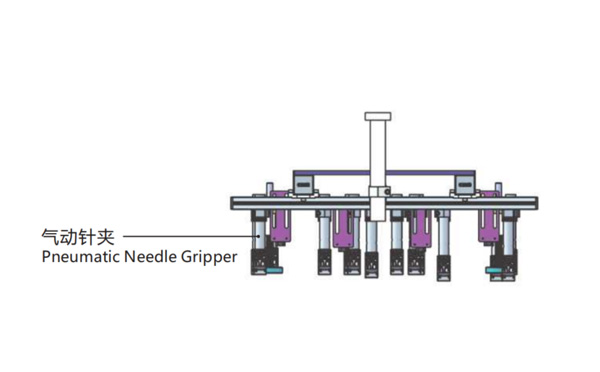
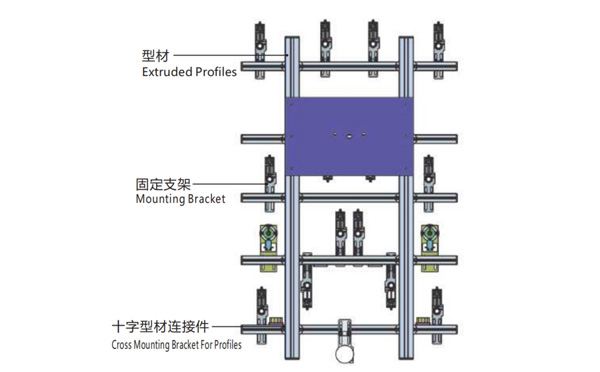
Product Descriptions
Bom List
| Product Name | PN # | Model | Quantity |
|---|---|---|---|
| Extruded Profiles | 4.Y00052 | PEP4040-1000 | 2 |
| Plugs for Profile | 4.Y00072 | PEP4040 | 4 |
| Extruded Profiles | 4.Y000481 | PEP2525-1500 | 2 |
| Extruded Profiles | 4.Y00481 | PEP2525-1000 | 1 |
| Plugs for Profile | 4.Y00070 | PEP2525 | 10 |
| Cross Mounting Bracket for Profiles | 7.Y00356-T | SMBA-2540T | 10 |
| Pneumatic Needle Gripper | 8.Y00025 | GN2010 | 14 |
| Mounting Bracket | 7.Y00308-T | SMBE2-2060T | 14 |
| Mounting Bracket | 7.Y00309-T | SMBE2-3060T | 1 |
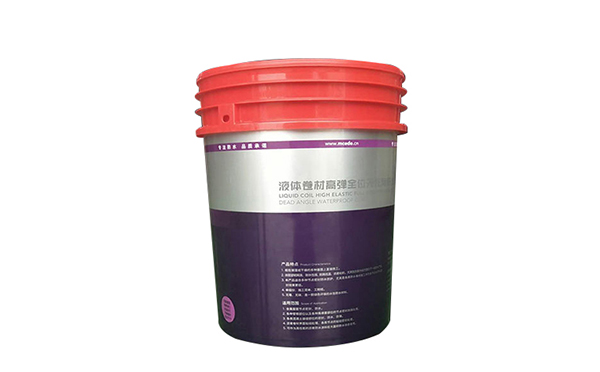
What would be a price smart configuration for the production of 20L paint buckets?
With more producers of the pails for paints introduced IML system in their production, it make the IML paints pails market getting more and more competitive. With a lower investment on the facilities will no doubt help to earn the investment back faster. Here is some recommendation of the IML solutions for 20L buckets for your reference.
As a 20L IML pails would be produced in an injection molding machine around 700T with a cycle time of 25s or longer, the robot to recommed would be SW7518DS by SWITEK Automation which is a 3 axis servo injection robot with a kick-back design, the best structure for deep cavity parts picking like an IML pails. It's the top choosed robot for an IML system of 20L paint buckets.
As a deep cavity IML container, the injection molding machine would be very important because it'll request a much larger opening stroke to ensure that the IML robot will have sufficient space to pick the buckets and insert the label. The injection molding machine to recommend here is the HD700U seriese of injection molding machine produced by HAIDA. This machine is specially designed for the production of IML pails > 20L with enlarged opening strokes.
For any more questions about the production of 20L IML pails for paints please just feel free to contact Adams to get a ready to work turn-key IML solution.