
sales06@switek.biz

+86 186 5927 5869

Shopping

Subscrib to Us
sales06@switek.biz
+86 186 5927 5869
Shopping
Subscrib to Us

Keywords:Panasonic A6 Servo Installation Instruction, Panasonic A6 Driver, Panasonic A6 Series Servo Motor Manual
The correct setup of the parameter and mode of the Panasonic A6 series of servo will ensure the proper working of the Panasonic A6 series of motor and the stability of your machineries and automation system.
This driver is equipped with various parameters to set up its characteristics and functions. This section describes the function and purpose of each parameter. Read and comprehand very well so that you can adjust this driver in optimum condition for your running requirements.
• You can refer and set up the parameter with either one of the following.
1) front panel of the driver
2) combination of the setup support software, "PANATERM" and PC.
Note → How to control the front panel, refer to P.2-74.
It is possible to connect your personal computer to connector X1 of MINAS A6 using a USB cable for personal computer connection. Downloading the setup support software "PANATERM" from out web site and installing it on your personal computer will allow you to perform the following easily. • With the PANATERM, you can execute the followings.
Note → Because no production software such as CD-ROM is available, download the setup support software from our web site and install it on your personal computer.
• USB cable
On the driver, use commercially available USB mini-B connector.
The connector on the personal computer side should be in accordance with the specifications of the PC.
When the cable does not have noise filter, attach a signal line noise filter (DV0P1460) to both ends of the cable.
Related page → • P.4-2 "Details of Parameter" • P.7-26 "Setup support software [PANATERM]"
| Parameter No. | Class name | Group | page | |
|---|---|---|---|---|
| Class | No.* | |||
| 0 | 00 to 18 | Basic setting | Parameter for Basic setting | P.2-52 |
| 1 | 00 to 78 | Gain adjustment | Parameter for Gain adjustment | P.2-52 |
| 2 | 00 to 37 | Damping control | Parameter fro Damping | P.2-55 |
| 3 | 00 to 29 | Verocity/Torque/Full-closed control | Parameter for Verocity/Torque/Fullclosed control | P.2-57 |
| 4 | 00 to 57 | I/F monitor setting | Parameter for I/F monitor setting | P.2-58 |
| 5 | 00 to 86 | Enhancing setting | Parameter for Enhancing setting | P.2-60 |
| 6 | 00 to 98 | Special setting | Parameter for Special setting | P.2-63 |
| 7 | 00 to 93 | Special setting | Parameter for Special setting | P.2-66 |
| 8 | 00 to 19 | For manufacturer's use | Not be used. | P.2-67 |
| 9 | 00 to 50 | For manufacturer's use | Not be used. | P.2-68 |
| 15 | 00 to 35 | For manufacturer's use | Not be use | P.2-69 |
*The Parameter No. consists of 2 digits.
| Symbol | Control mode | Setup value of Pr0.01 |
|---|---|---|
| P | Position control | 0 |
| S | Velocity control | 1 |
| T | Torque control | 2 |
| F | Full-closed control | 6 |
| P/S | Position (1st/Velocity (2nd) control | 3* |
| P/T | Position (1st/Torque (2nd) control | 4* |
| S/T | Velocity (1st/Torque (2nd) control | 5* |
* When you select the combination mode of 3, 4 or 5, you can select either 1st or 2nd with control mode switching input (C-MODE).
When C-MODE is ON: 1st mode selection
When C-MODE is OFF: 2nd mode selection
Do not enter the command 10ms before/after the switching.

SW6310D-20
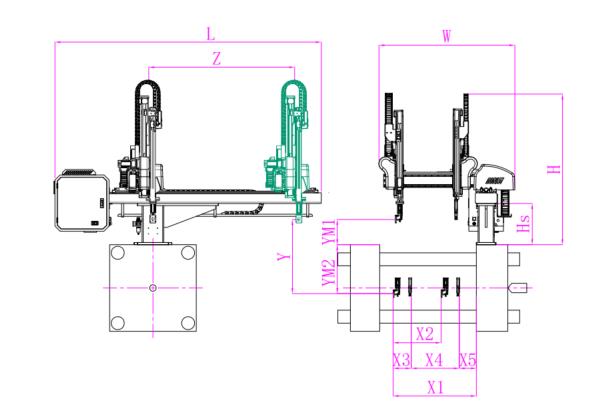
Unit: mm
| X1 | X2 | X3 | X4 | Y | YM1 | YM2 | Z | L | W | H | Payload | 740 | 640 | 140 | 415 | 1000 | 235 | 765 | 1650 | 2640 | 1500 | 1580 | 3kg |
|---|
EOAT Assembly Demonstration -- One Cavity In Mold Insertion EOAT With Mold Positioner
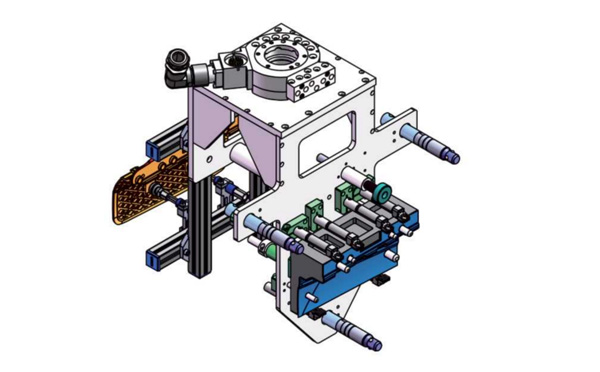
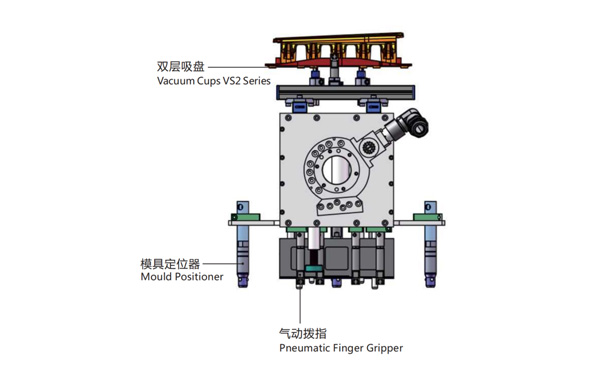
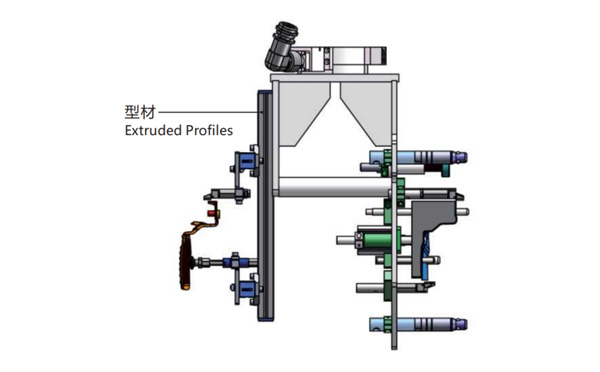
Product Descriptions
Bom List
| Product Name | PN # | Model | Quantity |
|---|---|---|---|
| Extruded Profiles | 4.Y00481 | PEP2525-1500 | 1 |
| Plugs for Profile | 4.Y00070 | PEP2525 | 8 |
| Mould Positioner | 8.Y00088 | GMP20A | 3 |
| Vacuum Cups VS2 Series | 1.Y05310 | VS2-SA20 | 2 |
| Rotative Suspensions | 8.Y00061 | VFR1421-G18 | 2 |
| Pneumatic Finger Gripper | 8.Y00084 | GFR14-95G | 7 |
| Extension Tube | 7.Y00733 | SMBY14-50 | 6 |
| Mounting Bracket | 7.Y00200-T | SMBE1-1440T | 3 |
| Cross Mounting Bracket for Profiles | 7.Y00194-T | SMBA-2525T | 4 |
| Vacuum Cup Fittings | 7.Y00703 | VM02-G18 | 2 |
For 20/33L Pails IML Prodcution, Which Injection Molding Machine Would Be the Best One for This IML Project?
For the IML production of 20/33L pails, HaiDa machinery, which was founded in 1992, has a special high precision injection molding machine HD700U specialized for the IML production of 20/33L IML pails. With a clamping force of 700T and enlarged opening stroke up to 1060mm, which enable it to IML produce a deeper pails.
As a mate to Haida HD700U, the largest IML Robot among the SW8 Series of SWITEK Automation SW850 provide a perfect side entry IML solutions for the IML production of 20/33L pails. The combination of Haida HD700U + SWITEK SW850 IML Robot will provide the IML pails producer a price smart pails IML Solutions.


