sales06@switek.biz

+86 186 5927 5869

Shopping

Subscrib to Us
sales06@switek.biz
+86 186 5927 5869
Shopping
Subscrib to Us

Keywords:IML Robot; IML Robot Operating; In Mold Labeling Robotics
The IML robot will working automatically in IML production of the containers after programming and parameter setting. Toggle the knob in the upper left corner of the teach pendant to AUTO, and the interface of the IML robot will jumps to the following automatic screen. In this chapter we're introducing the functions of each buttom you can see in the Auto mold of the IML robot.
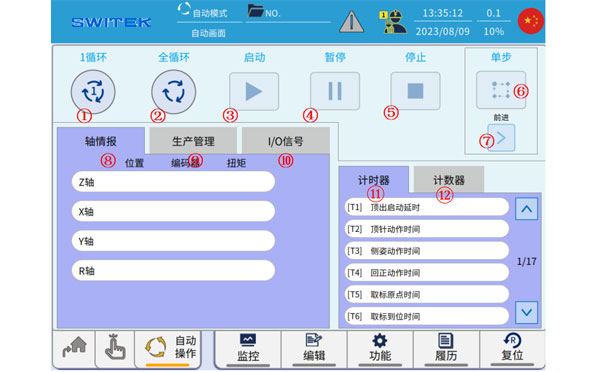
| No | Name | Function |
|---|---|---|
| (1) | 1 Cycle |
|
| (2) | Full cycle |
|
| (3) | Start |
|
| (4) | Pause |
|
| (5) | Stop |
|
| (6) | Single step |
|
| (7) | Forward/Backward |
|
| (8) | Axis intelligence |
|
| (9) | Production management |
|
| (10) | I/O signals |
|
| (11) | Timer |
|
| (12) | Counter |
|

SW6310-20
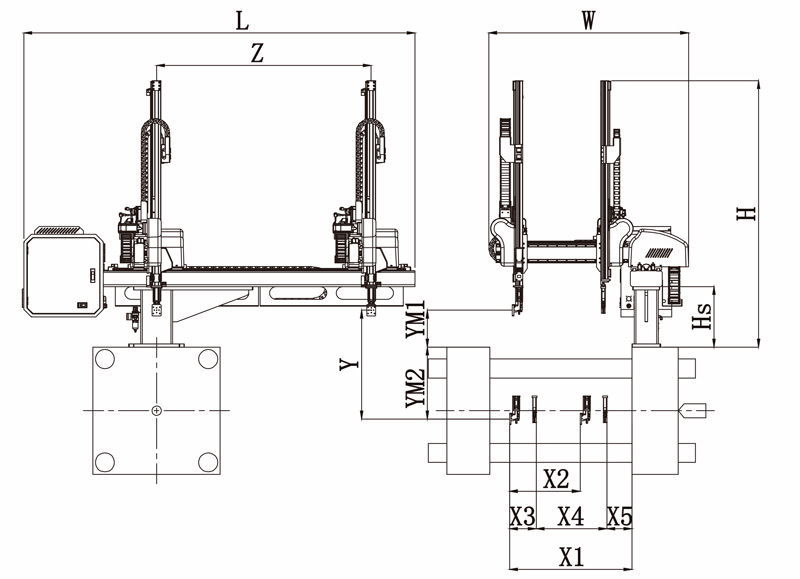
Unit: mm
| X1 | X2 | X3 | X4 | Y | YM1 | YM2 | Z | L | W | H | Payload | 980 | 640 | 165 | 645 | 1000 | 235 | 765 | 1700 | 2640 | 1500 | 1930 | 3kg |
|---|
EOAT Assembly Demonstration -- Two Cavities Parts Picking EOAT with Runner Cutting by Air Nipper
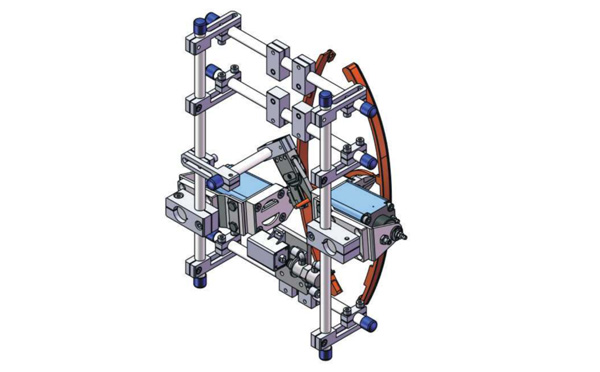
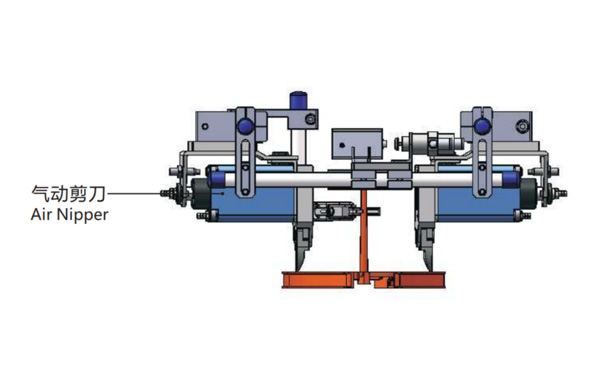
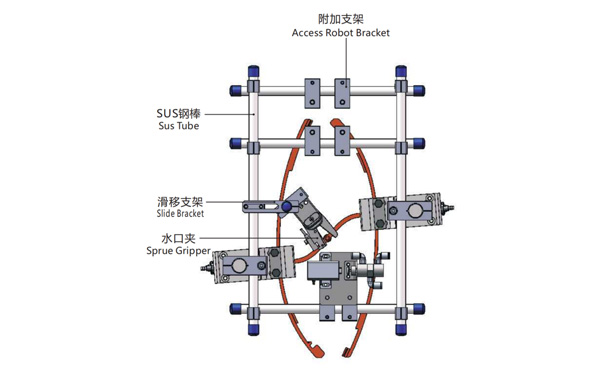
Product Descriptions
Bom List
| Product Name | PN # | Model | Quantity |
|---|---|---|---|
| Sus Tube | 4.Y00021 | PST12-1500 | 2 |
| Air Nipper | 1.Y00004 | GT-NY25 | 2 |
| Straight Blades for Plastic | 1.Y00037 | NY25AJ | 2 |
| Fixing Block | 7.Y00633 | SCE2-25 | 2 |
| Tube Plugs | 1.Y03638 | PST12-1500 | 11 |
| Cross Connector | 7.Y00027 | SMBT-2012 | 2 |
| Access Robot Bracket | 7.Y00002 | SMBH1-12M6 | 6 |
| L-Type Thread Hose Fitting | 1.Y02809 | APL6-M5 | 3 |
| Slide Bracket | 7.Y00004 | SCF4-1240W16 | 7 |
| Slide Bracket | 7.Y00001 | SMBS-12T16 | 7 |
| Sprue Gripper | 8.Y00091 | GR12-12-CN | 1 |
| Cross Connector | 7.Y00020 | SMBT-1212 | 1 |
Which Robot is the Best one for Haitian JU1080~JU4000 Two Platen Injection Molding Machine?
Although the clamping force of the 5th generation of Haitian JUPITER series of two platen injection molding machine reached a historical height of 88000kN, the most widely used injection molding machines are still within the range of 10,800kN ~ 40,000 kN in the automotive parts production business. As we can find from the introduction of the Haitian 5th generation JUPITER series injection molding machine, the robot for the injection molding machine will count the new abilities of it:
For the 5th generation of JUPITER series two platen injection molding machine, the robot to recommend is SWITEK SW77 series of 3 axis servo injection robot. With a kick-back design and a payload up to 75kg, the SW77 series of injection robot will provide 30% more of EOAT working space. Further more, with optional extra servo Axis A, B & C, the SW77 series of injection robot will provide more flexibility for the EOAT design of a complex mold, which made it the best robot for injection automation project with a JUPITER injection molding machine.
For free consultation of injection robot selection and injection automation integration, please feel free to contact Adams from SWITEK to get team support of your new injection project.