sales06@switek.biz

+86 186 5927 5869

Shopping

Subscrib to Us
sales06@switek.biz
+86 186 5927 5869
Shopping
Subscrib to Us

Keywords:Panasonic A6 Servo Installation Instruction, Panasonic A6 Driver, Panasonic A6 Series Servo Motor Manual
The correct setup of the parameter and mode of the Panasonic A6 series of servo will ensure the proper working of the Panasonic A6 series of motor and the stability of your machineries and automation system.
| Parameter No. | Title | Range | Default | Unit | Turning on of power supply | Related Control Mode | Detail page | ||||||
|---|---|---|---|---|---|---|---|---|---|---|---|---|---|
| Class | No. | A, B-frame | C-frame | D,E,F-frame | P | S | T | F | |||||
| 5 | 00 | 2nd numberator of electronic gear | 0 to 230 | 0 | — | ○ | ○ | 4-52 | |||||
| 5 | 01 | 3rd numberator of electronic gear | 0 to 230 | 3 | — | ○ | ○ | ||||||
| 5 | 02 | 4th numberator of electronic gear | 0 to 230 | 3 | — | ○ | ○ | ||||||
| 5 | 03 | Denominator of pulse output division | 0 to 8388608 | 0 | — | ○ | ○ | ○ | ○ | ○ | |||
| 5 | 04 | Over-travel inhibit input setup | 0 to 2 | 1 | — | ○ | ○ | ○ | ○ | ○ | |||
| 5 | 05 | Sequence at over-travel inhibit | 0 to 2 | 0 | — | ○ | ○ | ○ | ○ | ○ | 4-53 | ||
| 5 | 06 | Sequence at Servo-Off | 0 to 9 | 0 | — | ○ | ○ | ○ | ○ | 4-54 | |||
| 5 | 07 | Sequence at main power OFF | 0 to 9 | 0 | — | ○ | ○ | ○ | ○ | ||||
| 5 | 08 | LV trip selection at main power OFF | 0 to 3 | 1 | — | ○ | ○ | ○ | ○ | 4-55 | |||
| 5 | 09 | Detection time of main power off | 20 to 2000 | 70 | 1 ms | ○ | ○ | ○ | ○ | ○ | |||
| 5 | 10 | Sequence at alarm | 0 to 7 | 0 | — | ○ | ○ | ○ | ○ | ||||
| 5 | 11 | Torque setup for emergency stop | 0 to 500 | 0 | % | ○ | ○ | ○ | ○ | 4-56 | |||
| 5 | 12 | Over-load level setup | 0 to 500 | 0 | % | ○ | ○ | ○ | ○ | ||||
| 5 | 13 | Over-speed level setup | 0 to 20000 | 0 | r/min | ○ | ○ | ○ | ○ | ||||
| 5 | 14 | Motor working range setup | 0 to 1000 | 10 | 0.1 revolution* | ○ | ○ | ||||||
| 5 | 15 | I/F reading filter | 0 to 3 | 0 | — | ○ | ○ | ○ | ○ | ○ | |||
| 5 | 16 | Alarm clear input setup | 0 to 1 | 0 | — | ○ | ○ | ○ | ○ | ○ | |||
| 5 | 17 | Counter clear input mode | 0 to 4 | 3 | — | ○ | ○ | 4-57 | |||||
| 5 | 18 | Invalidation of command pulse inhibit input | 0 to 1 | 1 | — | ○ | ○ | ||||||
| 5 | 19 | Command pulse inhibit input reading setup | 0 to 5 | 0 | — | ○ | ○ | ○ | |||||
| 5 | 20 | Position setup unit select | 0 to 1 | 0 | — | ○ | ○ | ○ | 4-58 | ||||
| 5 | 21 | Selection of torque limit | 0 to 6 | 1 | — | ○ | ○ | ○ | |||||
| 5 | 22 | 2nd torque limit | 0 to 500 | 500*1 | % | ○ | ○ | ○ | |||||
| 5 | 23 | Torque limit switching setup 1 | 0 to 4000 | 0 | ms/100% | ○ | ○ | ○ | |||||
| 5 | 24 | Torque limit switching setup 2 | 0 to 4000 | 0 | ms/100% | ○ | ○ | ○ | 4-59 | ||||
| 5 | 25 | External input positive direction torque limit | 0 to 500 | 500*1 | % | ○ | ○ | ○ | |||||
| 5 | 26 | External input negative direction torque limit | 0 to 500 | 500*1 | % | ○ | ○ | ○ | |||||
| 5 | 27 | Input gain of analog torque limit | 10 to 100 | 30 | 0.1V/100%* | ○ | ○ | ○ | |||||
| 5 | 28 | LED initial status | 0 to 42 | 1 | — | ○ | ○ | ○ | ○ | ○ | 4-60 | ||
| 5 | 29 | RS232 baud rate setup | 0 to 7 | 2 | — | ○ | ○ | ○ | ○ | ○ | |||
| 5 | 30 | RS485 baud rate setup | 0 to 7 | 2 | — | ○ | ○ | ○ | ○ | ○ | |||
| 5 | 31 | Axis address | 0 to 127 | 1 | — | ○ | ○ | ○ | ○ | ○ | 4-61 | ||
| 5 | 32 | Command pulse input maximum setup | 250 to 8000 | 4000 | kpulse/s | ○ | ○ | ○ | |||||
| 5 | 33 | Pulse regenerative output limit setup | 0 to 1 | 0 | — | ○ | ○ | ○ | ○ | ○ | |||
| 5 | 34 | For manufacturer's use | — | 4 | — | ||||||||
| 5 | 35 | Front panel lock setup | 0 to 1 | 0 | — | ○ | ○ | ○ | ○ | ○ | |||
| 5 | 36 | For manufacturer's use | — | 0 | — | 4-62 | |||||||
| 5 | 37 | Modbus connection setting | 0 to 2 | 0 | — | ○ | ○ | ○ | ○ | ○ | |||
| 5 | 38 | Modbus communication setting | 0 to 5 | 0 | — | ○ | ○ | ○ | ○ | ○ | |||
| 5 | 39 | Modbus response waiting time | 0 to 10000 | 0 | ms | ○ | ○ | ○ | ○ | ||||
| 5 | 40 | Modbus communication timeout time | 0 to 10000 | 0 | ms | ○ | ○ | ○ | ○ | ||||
| 5 | 41 | For manufacturer's use | — | 0 | — | ||||||||
| 5 | 42 | Modbus broadcast setting | -32768 to 32767 | 0 | — | ○ | ○ | ○ | ○ | 4-63 | |||
| 5 | 45 | Quadrant projection positive direction compensation value | -1000 to 1000 | 0 | 0.1% | ○ | ○ | ||||||
| 5 | 46 | Quadrant projection negative direction comensation value | -1000 to 1000 | 0 | % | ○ | ○ | ||||||
| 5 | 47 | Quadrant projection compensation delay time | 0 to 1000 | 0 | ms | ○ | ○ | ||||||
| 5 | 48 | Quadrant projection compensation filter setting L | 0 to 6400 | 0 | 0.01 ms | ○ | ○ | ||||||
| 5 | 49 | Quadrant projection compensation filter setting H | 0 to 10000 | 0 | 0.1 ms | ○ | ○ | ||||||
| 5 | 50 | For manufacturer's use | — | 0 | — | 4-64 | |||||||
| 5 | 51 | For manufacturer's use | — | 0 | — | ||||||||
| 5 | 52 | For manufacturer's use | — | 0 | — | ||||||||
| 5 | 53 | For manufacturer's use | — | 0 | — | ||||||||
| 5 | 54 | For manufacturer's use | — | 0 | — | ||||||||
| 5 | 55 | For manufacturer's use | — | 0 | — | ||||||||
| 5 | 56 | Slow stop deceleration time setting | 0 to 10000 | 0 | ms/(1000 r/min) | ○ | |||||||
| 5 | 57 | Slow stop S-shape acceleration and deceleration setting | 0 to 1000 | 0 | ms | ○ | |||||||
| 5 | 58 | Modbus mirror register setting 1*1 | -32768 to 32767 | 24591 | — | ○ | ○ | ○ | ○ | ○ | |||
| 5 | 59 | Modbus mirror register setting 2*1 | -32768 to 32767 | 24592 | — | ○ | ○ | ○ | ○ | ○ | |||
| 5 | 60 | Modbus mirror register setting 3*1 | -32768 to 32767 | 16421 | — | ○ | ○ | ○ | ○ | ○ | |||
| 5 | 61 | Modbus mirror register setting 4*1 | -32768 to 32767 | 24613 | — | ○ | ○ | ○ | ○ | ○ | 4-65 | ||
| 5 | 62 | Modbus mirror register setting *1 | -32768 to 32767 | 17429 | — | ○ | ○ | ○ | ○ | ○ | |||
| 5 | 63 | Modbus mirror register setting 6*1 | -32768 to 32767 | 17418 | — | ○ | ○ | ○ | ○ | ○ | |||
| 5 | 64 | Modbus mirror register setting 7*1 | -32768 to 32767 | 17427 | — | ○ | ○ | ○ | ○ | ○ | |||
| 5 | 65 | Modbus mirror register setting 8*1 | -32768 to 32767 | 17419 | — | ○ | ○ | ○ | ○ | ○ | |||
| 5 | 66 | Deterioration diagnosis convergence judgment time | 0 to 10000 | 0 | 0.1s | ○ | ○ | ○ | ○ | ○ | |||
| 5 | 67 | Deterioration diagnosis inertia ratio upper limit | 0 to 10000 | 0 | % | ○ | ○ | ○ | ○ | ○ | |||
| 5 | 68 | Deterioration diagnosis inertia ratio lower limit | 0 to 10000 | 0 | % | ○ | ○ | ○ | ○ | ○ | |||
| 5 | 69 | Deterioration diagnosis unbalanced load upper limit | -1000 to 1000 | 0 | 0.1% | ○ | ○ | ○ | ○ | ○ | |||
| 5 | 70 | Deterioration diagnosis unbalanced load lower limit | -1000 to 1000 | 0 | 0.1% | ○ | ○ | ○ | ○ | ○ | |||
| 5 | 71 | Deterioration diagnosis dynamic friction upper limit | -1000 to 1000 | 0 | 0.1% | ○ | ○ | ○ | ○ | ○ | 4-66 | ||
| 5 | 72 | Deterioration diagnosis dynamic friction lower limit | -1000 to 1000 | 0 | 0.1% | ○ | ○ | ○ | ○ | ○ | |||
| 5 | 73 | Deterioration diagnosis viscous friction upper limit | 0 to 10000 | 0 | 0.1%/(10000 r/min) | ○ | ○ | ○ | ○ | ○ | |||
| 5 | 74 | Deterioration diagnosis viscous friction lower limit | 0 to 10000 | 0 | 0.1%/(10000 r/min) | ○ | ○ | ○ | ○ | ○ | |||
| 5 | 75 | Deterioration diagnosis velocity setting | -20000 to 20000 | 0 | r/min | ○ | ○ | ○ | ○ | ○ | |||
| 5 | 76 | Deterioration diagnosis torque average time | 0 to 10000 | 0 | ms | ○ | ○ | ○ | ○ | ○ | |||
| 5 | 77 | Deterioration diagnosis torque upper limit | -1000 to 1000 | 0 | 0.1% | ○ | ○ | ○ | ○ | ○ | |||
| 5 | 78 | Deterioration diagnosis torque lower limit | -1000 to 1000 | 0 | 0.1% | ○ | ○ | ○ | ○ | ○ | |||
| 5 | 79 | Modbus mirror register setting 9*1 | -32768 to 32767 | 17410 | — | ○ | ○ | ○ | ○ | ○ | 4-67 | ||
| 5 | 80 | Modbus mirror register setting 10*1 | -32768 to 32767 | 17411 | — | ○ | ○ | ○ | ○ | ○ | |||
| 5 | 81 | Modbus mirror register setting 11*1 | -32768 to 32767 | 16398 | — | ○ | ○ | ○ | ○ | ○ | |||
| 5 | 82 | Modbus mirror register setting 12*1 | -32768 to 32767 | 16402 | — | ○ | ○ | ○ | ○ | ○ | |||
| 5 | 83 | Modbus mirror register setting 13*1 | -32768 to 32767 | 16411 | — | ○ | ○ | ○ | ○ | ○ | |||
| 5 | 84 | Modbus mirror register setting 14*1 | -32768 to 32767 | 16405 | — | ○ | ○ | ○ | ○ | ○ | |||
| 5 | 85 | Modbus mirror register setting 15*1 | -32768 to 32767 | 16406 | — | ○ | ○ | ○ | ○ | ○ | |||
| 5 | 86 | Modbus mirror register setting 16*1 | -32768 to 32767 | 0 | — | ○ | ○ | ○ | ○ | ○ | |||
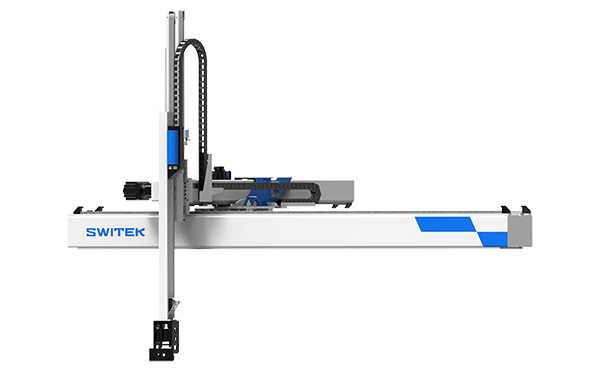
SW7730DS
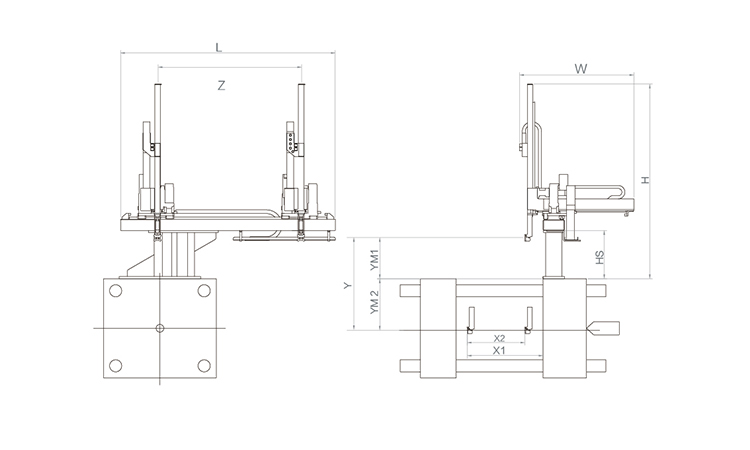
Unit: mm
| X1 | X2 | X3 | X4 | Y | YM1 | YM2 | Z | L | W | H | Payload | 2250 | 1720 | 0 | 0 | 3000 | 780 | 2220 | 4000 | 5050 | 3005 | 3440 | 75kg |
|---|
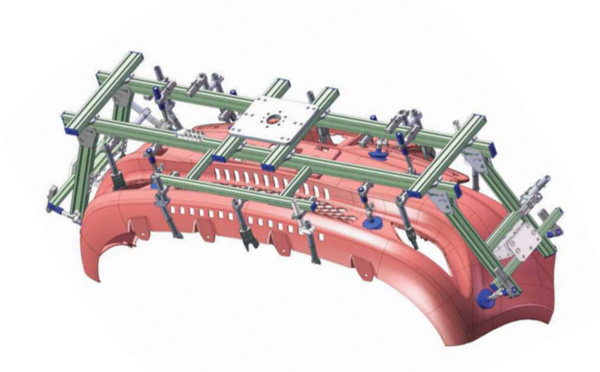
EOAT Assembly Demonstration -- One Cavity Car Bumper Picking EOAT
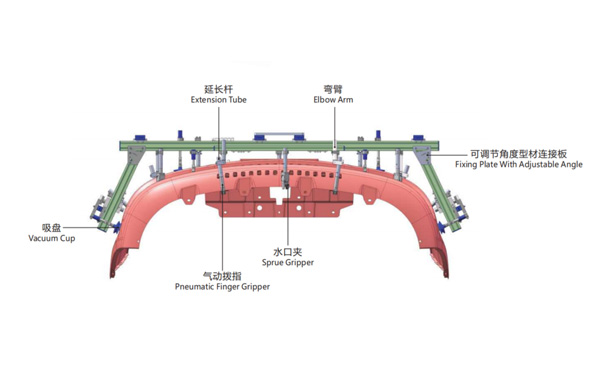
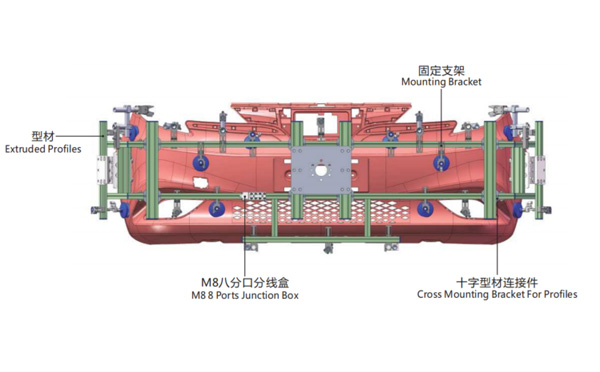
Product Descriptions
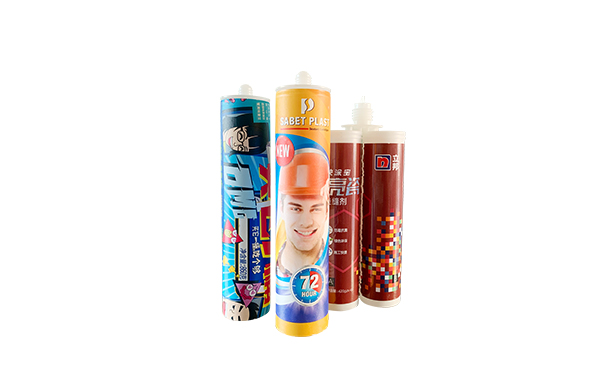
Injection Molding Machine for 8 Cavities IML Silicone Cartridge Tubes Production Recommending -- HaiTian MA3600/2250G
As the world largest manufacturer of the injection molding machine, to have a HaiTian injection molding machine for your IML Silicone cartridge tube is no doubt a guarantee of the continued localized service and reliable system performance. For an IML solutions of Silicone cartridge tubes with a daily output of around 26,000pcs of IML Silicone cartridge tubes, the recommend injection molding machine would be MA3600, below parameters of it for your reference:
With patented servo hydraulic drive system, Hiatian MARS series servo drive energy-saving injection molding machine is one of the best choice for the production of IML Silicone cartridge tubes which the total cycle time would be around 25s. With the custom made IML robot for Silicone cartridge tube by SWITEK you'll get price smart but reliable solutions of 8 cavities side entry IML Silicone cartridge solutions.
With the first IML robot delivered in 2009, SWITEK has built up sound relation with the key injection molding machine manufacturer and mold maker to provide you with a turn-key IML solutions of Silicone cartridge tubes.