sales06@switek.biz

+86 186 5927 5869

Shopping

Subscrib to Us
sales06@switek.biz
+86 186 5927 5869
Shopping
Subscrib to Us

With the control system developed by the Austria automatic company SIGMATEK GmbH & Co KG, SWITEK high speed side entry IML robot is providing a more efficient and outstanding performance for your quality bulk production of the IML Yogurt Cups.
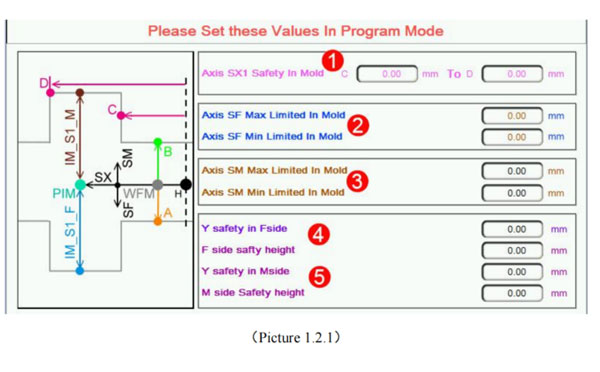
1.2.1 In Mold Safety Screen
Click  button into In Mold Safety screen, as the picture below 1.2.1;
Attention: Please Set these Values in program mode;
1.2.2 Standby Point Screen
Click  button to standby point screen as the picture below 1.2.2;
Attention: Please Set these Values in program mode
When modify the setting in this screen the Teach mode is needed;
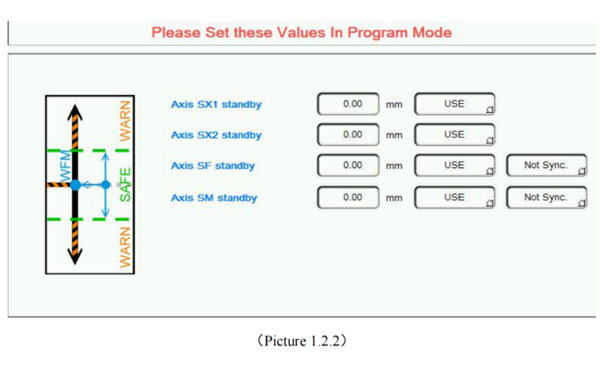
Standby position said robot in out-mold waiting for the injection molding machine module open, every axis position.
Use the option: This axis Whether to participate in standby movement. When choose to use, When standby running, the axis will run to the corresponding standby point position; When chose not to use, the axis is not affected by standby operation (continue to initial sstate action);
Seperate running options: Said when standby running of SF/SM, Whether with SX axis action; When choosing Separate running, the SX first run to the standby position, And then run SF/SM run to the standby point together (Precondition for the axis in standby movement).
1.2.3 Stack Parts Screen
Click  button to Stack Parts Screen as the picture below 1.2.3;
Attention: Please Set these Values in program mode;
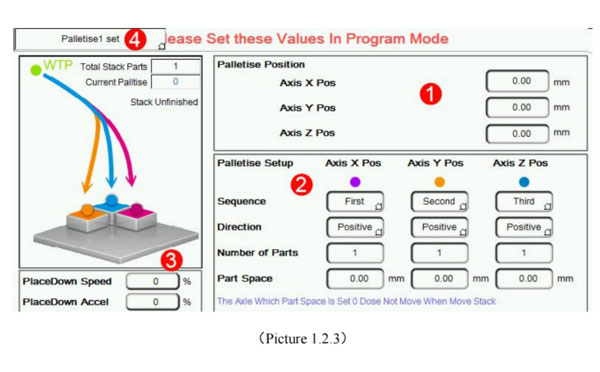
1.2.4 Get Label Screen
Click  button to get label screen as the picture below 1.2.4:
Attention: Please Set these Values in Program mode, get label case please see accessory 2.
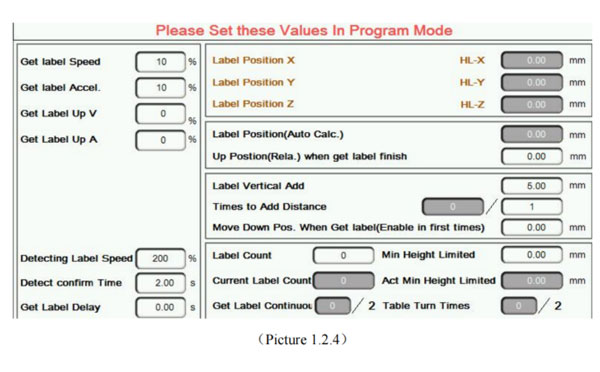
1.2.5 Reset Setting
Click  button to Reset Setting screen as the picture below 1.2.5:
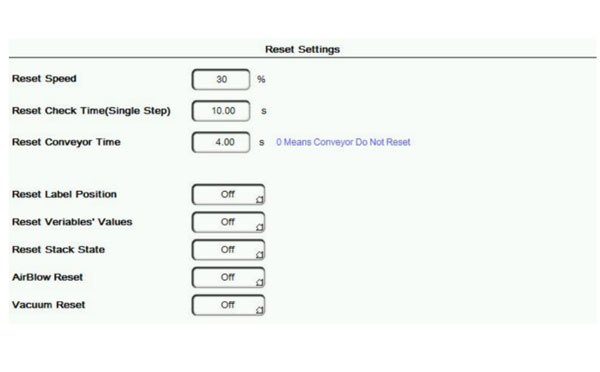

SW257C
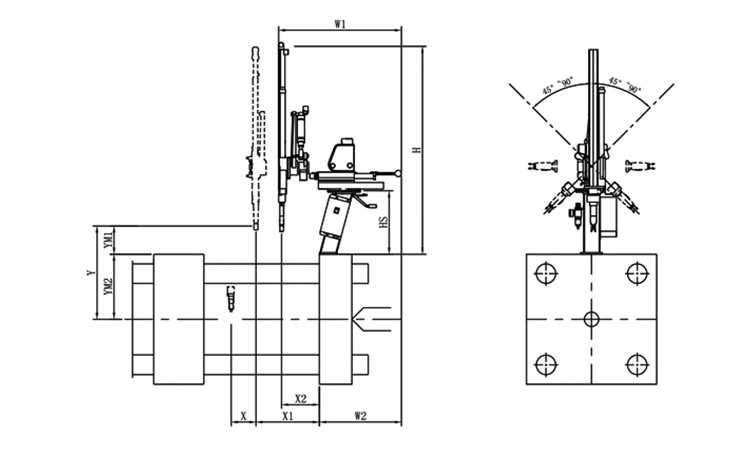
Unit: mm
| X1 | X2 | X3 | X4 | Y | YM1 | YM2 | Z | L | W | H | Payload | 300 | 100 | 0 | 0 | 695 | 215 | 480 | -45°~+45° | 650 | 650 | 1450 | 2kg |
|---|
EOAT Assembly Demonstration -- Two Cavities Parts Picking EOAT with Runner Cutting by Air Nipper
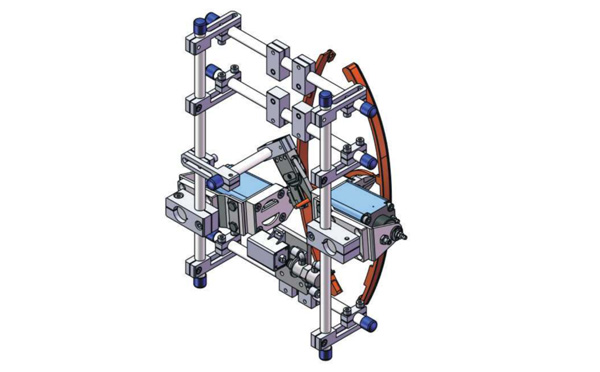
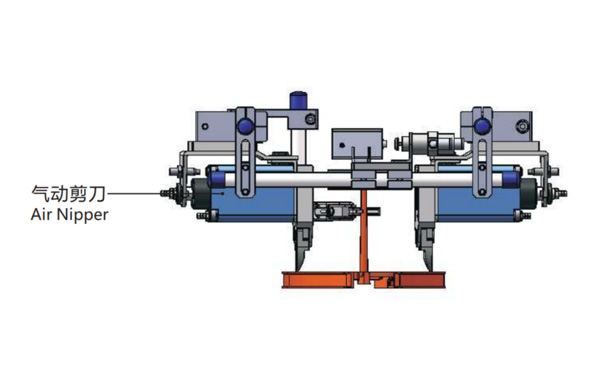
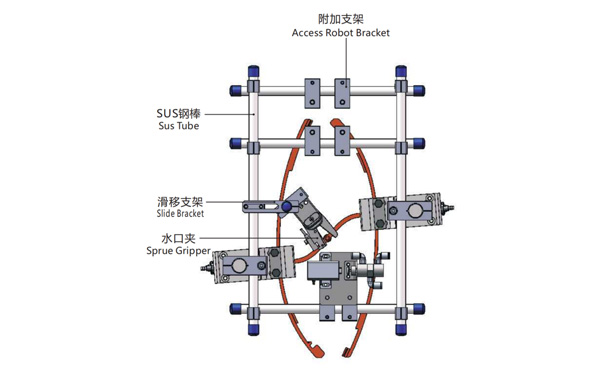
Product Descriptions
Bom List
| Product Name | PN # | Model | Quantity |
|---|---|---|---|
| Sus Tube | 4.Y00021 | PST12-1500 | 2 |
| Air Nipper | 1.Y00004 | GT-NY25 | 2 |
| Straight Blades for Plastic | 1.Y00037 | NY25AJ | 2 |
| Fixing Block | 7.Y00633 | SCE2-25 | 2 |
| Tube Plugs | 1.Y03638 | PST12-1500 | 11 |
| Cross Connector | 7.Y00027 | SMBT-2012 | 2 |
| Access Robot Bracket | 7.Y00002 | SMBH1-12M6 | 6 |
| L-Type Thread Hose Fitting | 1.Y02809 | APL6-M5 | 3 |
| Slide Bracket | 7.Y00004 | SCF4-1240W16 | 7 |
| Slide Bracket | 7.Y00001 | SMBS-12T16 | 7 |
| Sprue Gripper | 8.Y00091 | GR12-12-CN | 1 |
| Cross Connector | 7.Y00020 | SMBT-1212 | 1 |
Is the Stack Mold an Economic Solution for the Cutlery Production?
Stack mold is a popular solution of house hold products because it can maximize the productivity of the injection molding machine. But among the producers of the cutlery the stack mold is not popular, why and what's the advantages and disadvantages of the stack molds solutions for cutlery production?
The advantage of the stack mold solutions is the productivity of the system. As show on the stack mold solutions above that it's possible to produce 48 pcs of spoons or forks and have them well box packed in about 10s by a 280T injection molding machine (Which is a special injection molding machine designed by WEIDA machinery for the stack mold production, the nozzle of the injection molding machine is installed to the top of the injection molding machine) while would be possible to have a maximum of 32 cavities mold design by with a standard mold design.
Against the advantage of the stack mold solution, the disadvantages of the system is also obvious:
Anyway, cutlery packing system is systematic integration of the injection molding machine, the mold design and automation system design, the best way would be to contact Adams from SWITEK for a turn-key solution of the cutlery to get a ready to work cutlery packing system.